Decision support for small and mid-sized businesses
Your business's industrial engineer, one message away.
Ask about stock, purchasing, sales quotes, queues and demand forecasts in plain language. AI understands you; tested engineering methods do the math, and every result shows where it came from.
No technical knowledge, installation or new software required.
- Units and ranges
- Tested engine
- Decision trace
Recommended order quantity
426 boxes
- Reorder point
- 164 boxes
- Orders per year
- ≈ 14
- Method
- EOQ
Core principle
The math is never left to the AI.
AI understands
The language model is used only to understand your question, choose the right method and ask for missing inputs.
The engine calculates
Every formula is pre-written code, tested against textbook examples. The numbers never come from the AI.
Every result leaves a trace
Which method, which parameters, which data row: the decision report shows all of it.
The product itself
Not a mock-up: working screens.
These screenshots are from the application as it is today. The numbers are real engine output; the data belongs to a fictional hardware wholesaler.
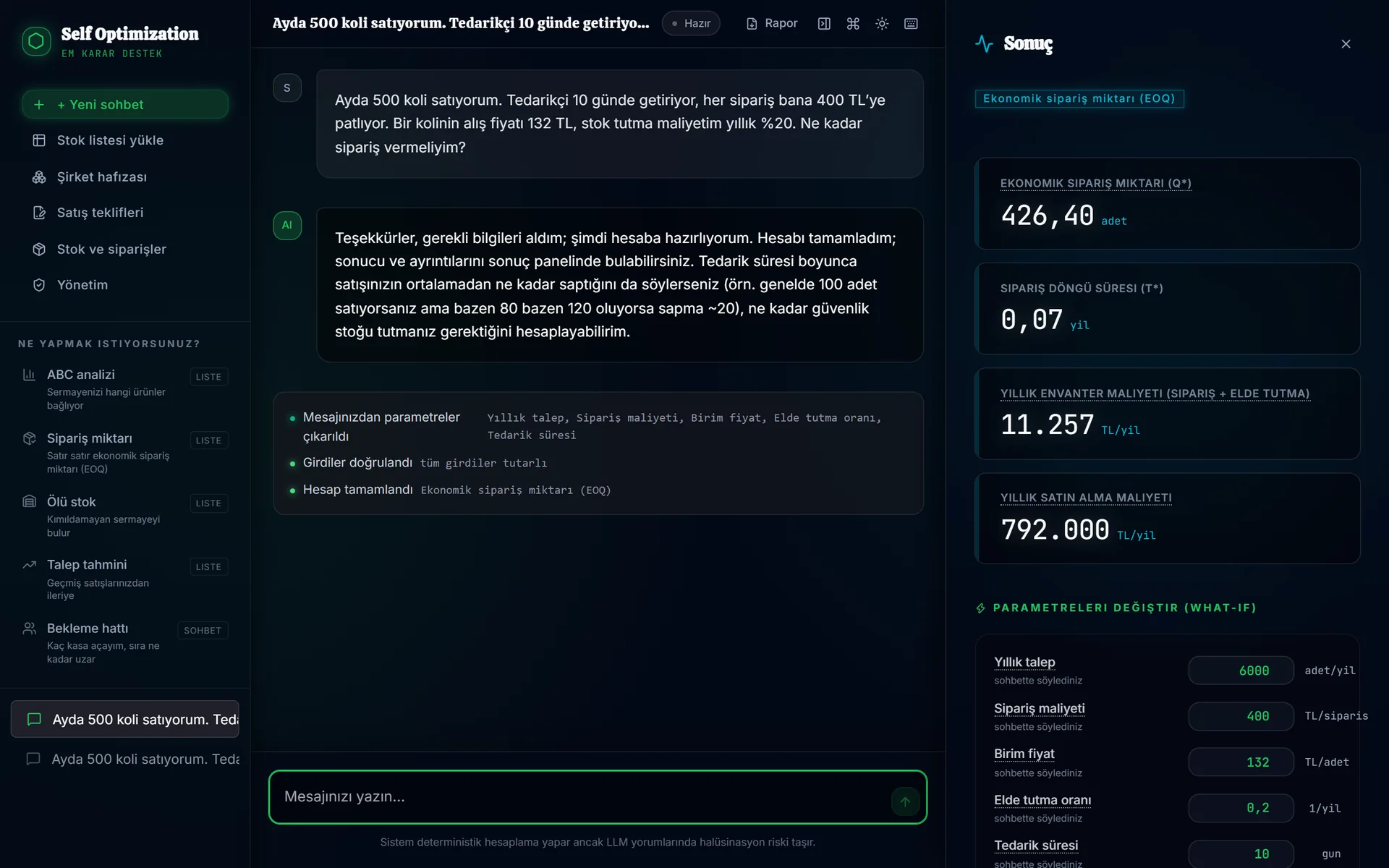
Type your question; the calculation opens on the right.
The AI extracts the parameters from your message, the validation layer checks them, the engine calculates. In the right panel you change a parameter and see the scenario again at once.
Try it yourself
How much should you order? See it in a minute.
Enter your own numbers; the result is calculated in your browser with the same textbook formula the product's engine uses. Nothing is sent anywhere.
Economic order quantity
426 units
- Reorder when stock falls to
- 164 units
- Orders per year
- ≈ 14.1
- Annual ordering + holding cost (at this quantity)
- 11,257 TL
Textbook EOQ, without safety stock. If your demand fluctuates you need safety stock; Self-Opt calculates that too and shows the assumptions it used.
What it covers
The decisions a business makes every day, in one place.
In the warehouse, at the till, on the order list and at the quoting desk. The modules connect: a quote becomes a purchase plan, the plan becomes an order, the order reaches the stock ledger.
Planning decisions
Describe it in chat; the method is chosen, missing inputs are asked for, the engine calculates.
Stock and purchasing
Upload the stock list exported from your ERP; columns are matched and the analysis is prepared.
Sales quotes
Prepare the quote on the document itself; totals, discount and margin are calculated by the engine.
How it works
Five steps. AI in the first two, math in the fourth.
The two never mix. The result is not a chat guess; it is a reproducible calculation.
- Step 1
You describe it
Write the problem in your own words (“I sell 500 a month, my supplier takes two weeks…”) or upload your stock list.
- Step 2
AI understands
It decides which method is needed and asks for what is missing. If it has to assume something, it tells you.
- Step 3
Validation layer
Inputs pass unit, logic and range checks. Inconsistent or missing data never reaches the calculation; you are told what is missing.
- Step 4
Deterministic engine
The calculation runs in pre-written, tested code. The same input always gives the same result; the AI never touches this step.
- Step 5
Result and explanation
The result is explained in plain language. Change parameters to compare scenarios; the decision report shows method and data.
Getting started
Start with the data you already have.
No need to switch systems. Self-Opt works alongside what you use today.
In the browser
Nothing to install. Sign in, type the problem or upload your file; the result and the decision report are on the same screen.
With your ERP export
Logo, Mikro, SAP or plain Excel: upload your stock list as it is. The agent suggests the columns, you confirm, and the mapping is remembered next time.
Connected to your system
If you want results to flow straight into your ERP, we set up the integration together as part of our digital transformation service.
Service
End-to-end digital transformation
When ready-made modules are not enough, we take on the whole job: process analysis, ERP selection and setup or integration with your existing ERP, and connecting decision modules to it. Not as a big-bang project: one process, a measurable result, then expand.
- 01
Process analysis and data inventory
Which decision is made where, with which data? We map that first; the first step of digital transformation is not software, it is this map.
- 02
ERP selection, setup and integration
If you have no ERP, selecting and setting up the right one; if you do, connecting to systems such as SAP, Logo or Mikro via API.
- 03
Connecting decision modules
Order quantities, alerts and route plans do not stay on separate screens; they flow straight into the system you use.
- 04
Website and customer portal
We build your website as part of your system, not a shop window: stock and orders flow into the ERP, customer requests into planning.
From the same team
If your decision is on the road, not in the warehouse: Akılkent
Self-Opt handles the warehouse, the till and the order list; Akılkent prepares daily route plans for operations with vehicles and stops. Same principle: proven methods do the math.
Frequently asked questions
Do I need technical knowledge to use it?
No. Describing your problem in everyday language is enough. The system decides which method is needed and asks you for missing inputs. You do not need to build formulas or spreadsheets.
Does the AI do the calculations?
No. In Self-Opt the math is never left to the AI. Every calculation runs in pre-written, tested code. The AI is used only to understand you and route you to the right method, so language-model hallucinations cannot leak into the numbers.
Does it work with my existing ERP or accounting software?
Yes. You can upload the Excel export from Logo, Mikro, SAP or any other system as it is; an AI agent suggests the column mapping, you confirm it, and the mapping is remembered next time. If you want results to flow straight into your ERP, we set up the API integration as part of our digital transformation service.
What data do I need to provide?
It depends on the decision. For order quantity: monthly sales, lead time and ordering cost. For queues: hourly arrivals and average service time. Forecasting works from past sales; stock analysis from the stock list exported from your ERP. If something is missing the system asks; inputs pass unit, logic and range checks before any calculation.
Is the product available in English?
The product interface is currently in Turkish and built for businesses in Turkey. Quotes can already be printed in English. Write to info@self-opt.com if you are interested in another language or market.
See it with your own data.
In a first call we listen to how your business runs and decide together which decision to start with. The call is free and carries no obligation.