Solutions

Hard decisions, simple screens.

Planning, stock and purchasing, sales quotes. Every module follows the same principle: AI understands you, a tested engine does the math, and the result shows where it came from.

Planning decisions

Describe it in chat; the method is chosen, missing inputs are asked for, the engine calculates.

When should I order, and how much?

Inventory optimization

From monthly sales, lead time and ordering cost it calculates the economic order quantity, safety stock and reorder point.

  • EOQ, safety stock and reorder point
  • Change a parameter and compare scenarios side by side
  • Assumptions are written next to the result
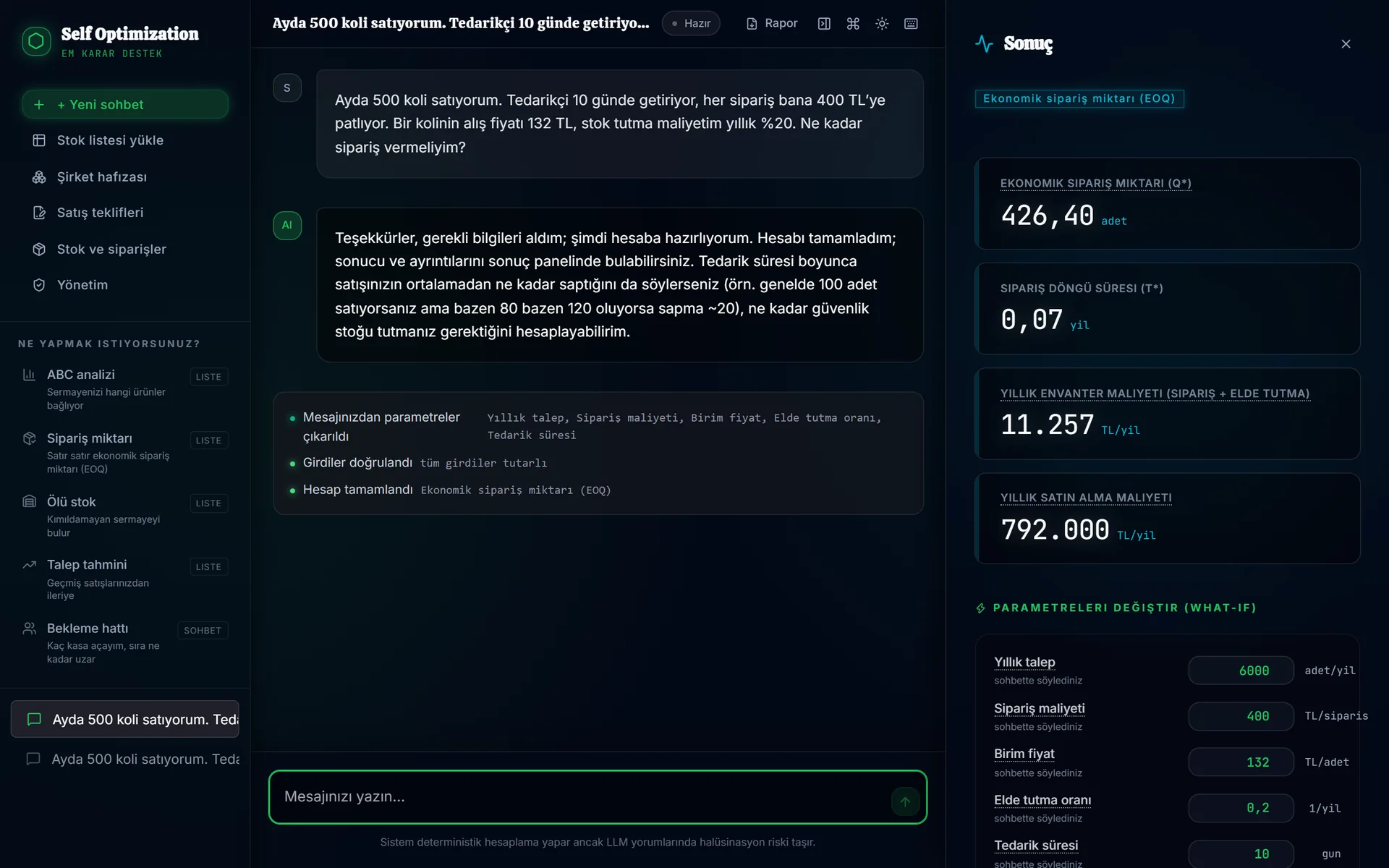
Self-Opt chat screen: economic order quantity of 426.40 units for a business selling 500 boxes a month; annual cost and editable parameters on the right.
Real screenshot (Turkish interface); data is fictional.

How many tills, desks or machines do I need?

Queues and capacity

From hourly arrivals and average service time it calculates average waiting time, utilization and the number of servers needed.

  • Queueing theory models (M/M/c)
  • Number of servers for a waiting-time target
  • Tills, clinics, production lines, call centers
Kasa sayısı
KasaDolulukOrt. bekleme
3%899,6 dk
4%671,1 dk

Karar izi

  • Model: M/M/c
  • Saatte 40 müşteri, kişi başı 4 dk
  • Hedef: ortalama bekleme 2 dk altı
Illustrative interface (the product UI is Turkish); values are an example.

How much will I sell next period?

Demand forecasting

Separates trend and seasonality in past sales and forecasts future periods with an interval, not a single number.

  • Trend and seasonality decomposition
  • Forecasts with an interval
  • Feeds directly into the stock calculation
Talep tahmini
Geçmiş satış Tahmin ve aralığı

Karar izi

  • Eğilim + mevsimsellik ayrıştırıldı
  • 24 aylık satış verisi
Illustrative interface (the product UI is Turkish); values are an example.

Stock and purchasing

Upload the stock list exported from your ERP; columns are matched and the analysis is prepared.

Which shelf is my money sitting on?

Stock list analysis

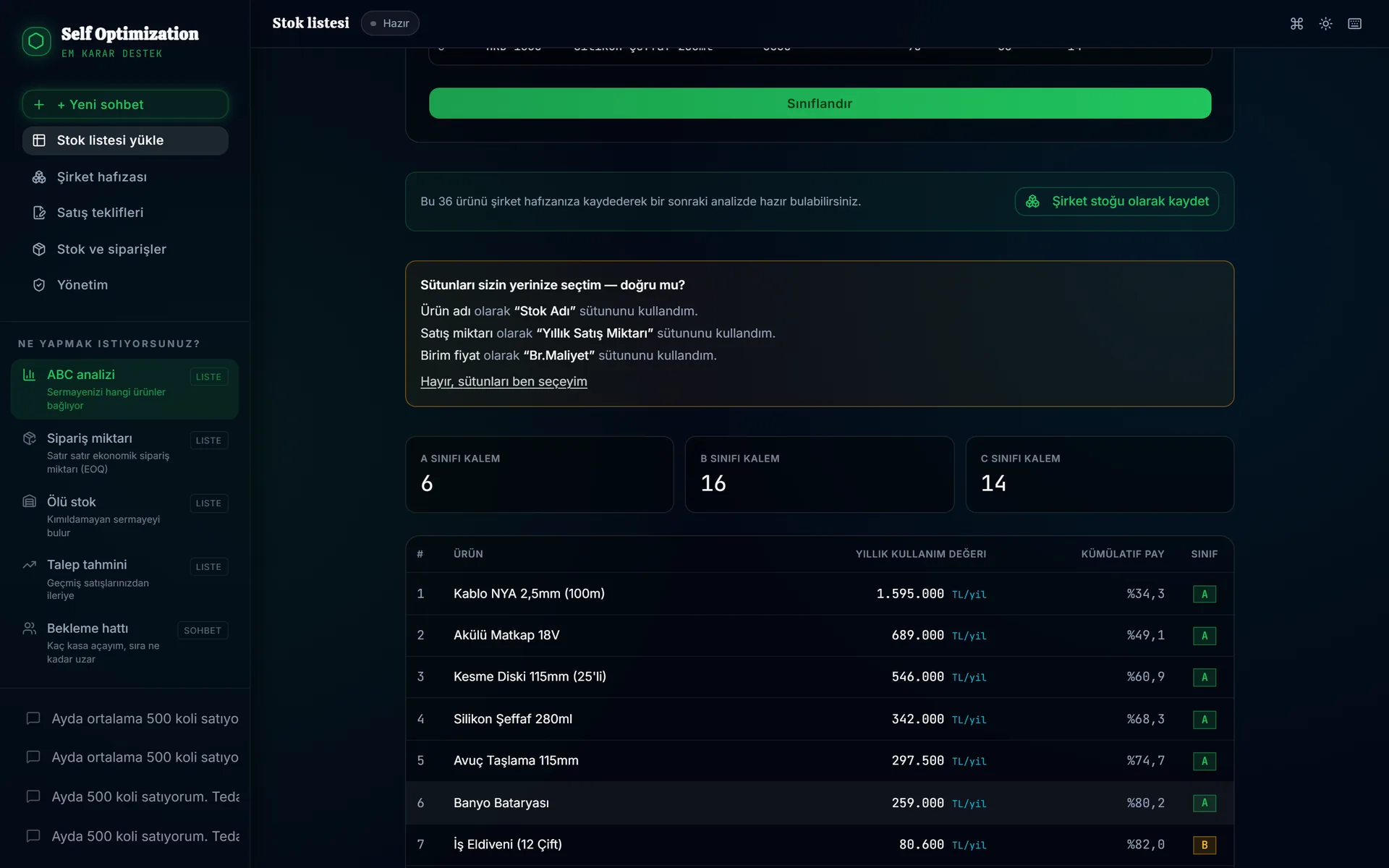
Upload an Excel or ERP export. An AI agent suggests which column is which, you confirm; you get an ABC classification and a dead-stock list.

  • ABC analysis and non-moving (dead) stock
  • Column mapping is remembered for the next upload
  • Every result shows which file and row it came from
ABC analysis: 6 A items, 16 B, 14 C; items ranked by annual usage value and cumulative share.
Real screenshot (Turkish interface); data is fictional.

What do I need to buy for this quote?

Purchase plan and orders

From an approved quote it derives net requirements: gross minus on hand minus on order. A purchase order opens from the plan in one click.

  • Net requirements (MRP logic), lot-for-lot or EOQ
  • Purchase orders: open, received, cancelled
  • Receipts are posted to the stock ledger automatically
Satın alma planı · Teklif T-2026-118
KalemBrütEldekiYoldaNet
Vana DN5040121018
Pompa 2,2 kW6600
SA-2026-0042 · açıkSiparişi oluştur →
Illustrative interface (the product UI is Turkish); values are an example.

What do I actually have?

Stock ledger

A ledger of counts, receipts and issues that is never deleted. Balances are derived from movements; negative stock is shown, not hidden.

  • Opening count from Excel
  • Stock is reduced when a quote is delivered
  • Who did what, and when
Stok defteri · Vana DN50
  • Açılış sayımı+1212
  • SA-2026-0042 teslim+2840
  • Teklif T-2026-118 teslim−400

Karar izi

  • Hareketler silinmez; bakiye hareketlerden türetilir
  • Her hareket kim ve ne zaman bilgisiyle
Illustrative interface (the product UI is Turkish); values are an example.

Sales quotes

Prepare the quote on the document itself; totals, discount and margin are calculated by the engine.

What price should I give the customer?

Quote preparation

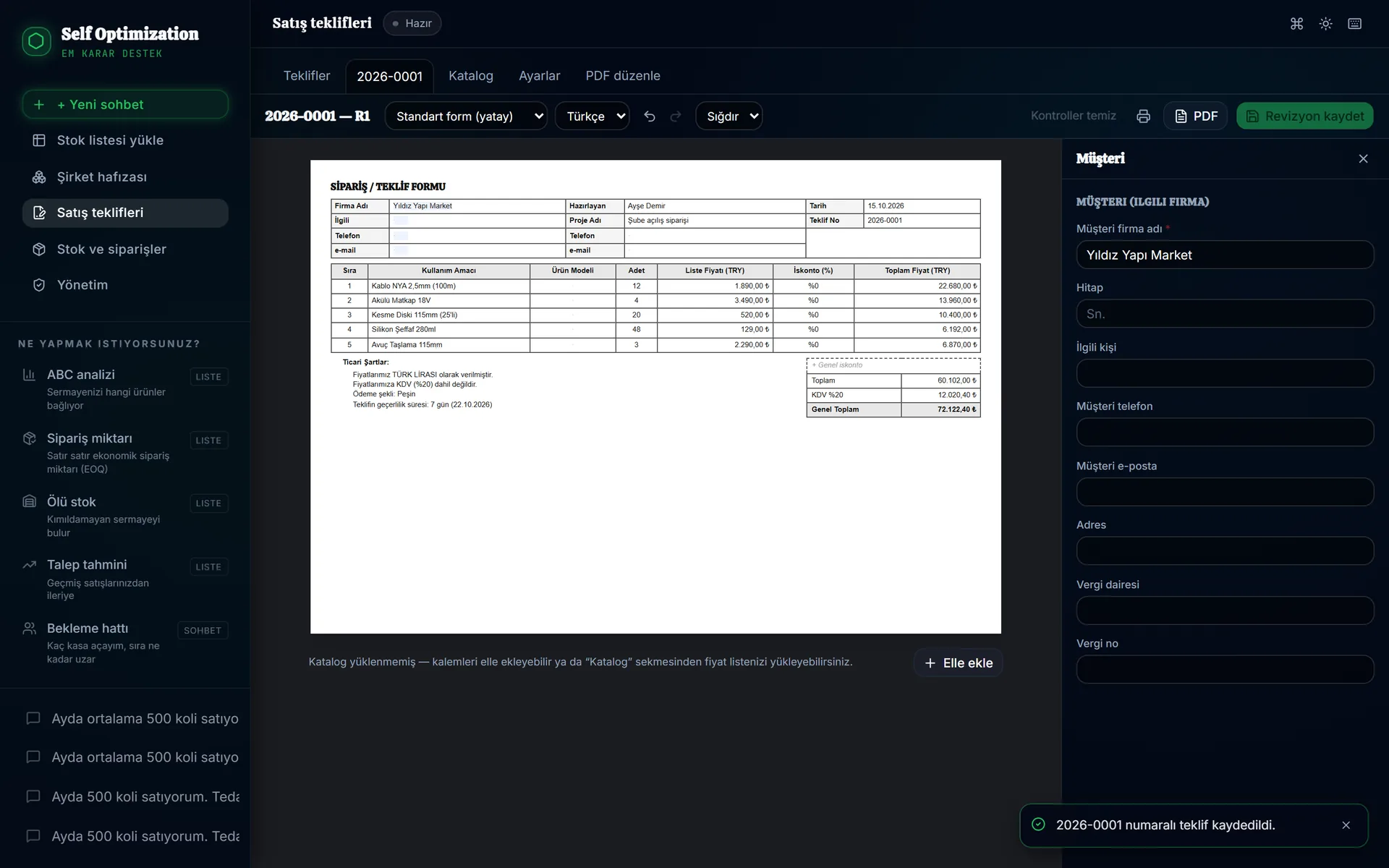
You edit the printable quote directly on screen. Give a target total and it back-calculates the discount required.

  • On-document editing, PDF output
  • Discount from a target total (reverse calculation)
  • Line cost, margin and below-cost warning
Sales quote editor: five-line quote form, subtotal 60,102 TL, 72,122.40 TL including VAT; customer details panel on the right.
Real screenshot (Turkish interface); data is fictional.

Do I have to retype my old PDFs?

Importing old and supplier quotes

Upload an old quote PDF and it becomes an editable draft. Turn a supplier quote into a customer quote draft with margin applied.

  • Draft from PDF; every field read is reported
  • Apply margin on supplier prices
  • Edit an external PDF in the browser
PDF'ten taslak
eski_teklif_mart.pdf
  • Müşteri ve tarih
  • 8 kalem, birim fiyatlar
  • KDV oranı
  • Teslim şartı: okunamadı, elle girin
Illustrative interface (the product UI is Turkish); values are an example.

Let's pick the decision to start with.

Most businesses start with one problem: too much stock, long queues, quotes typed by hand. In a first call we listen and pick the module that pays off fastest.

Talk to us →